Stop Prompting, Start Specifying: Hands-On with GitHub Spec Kit
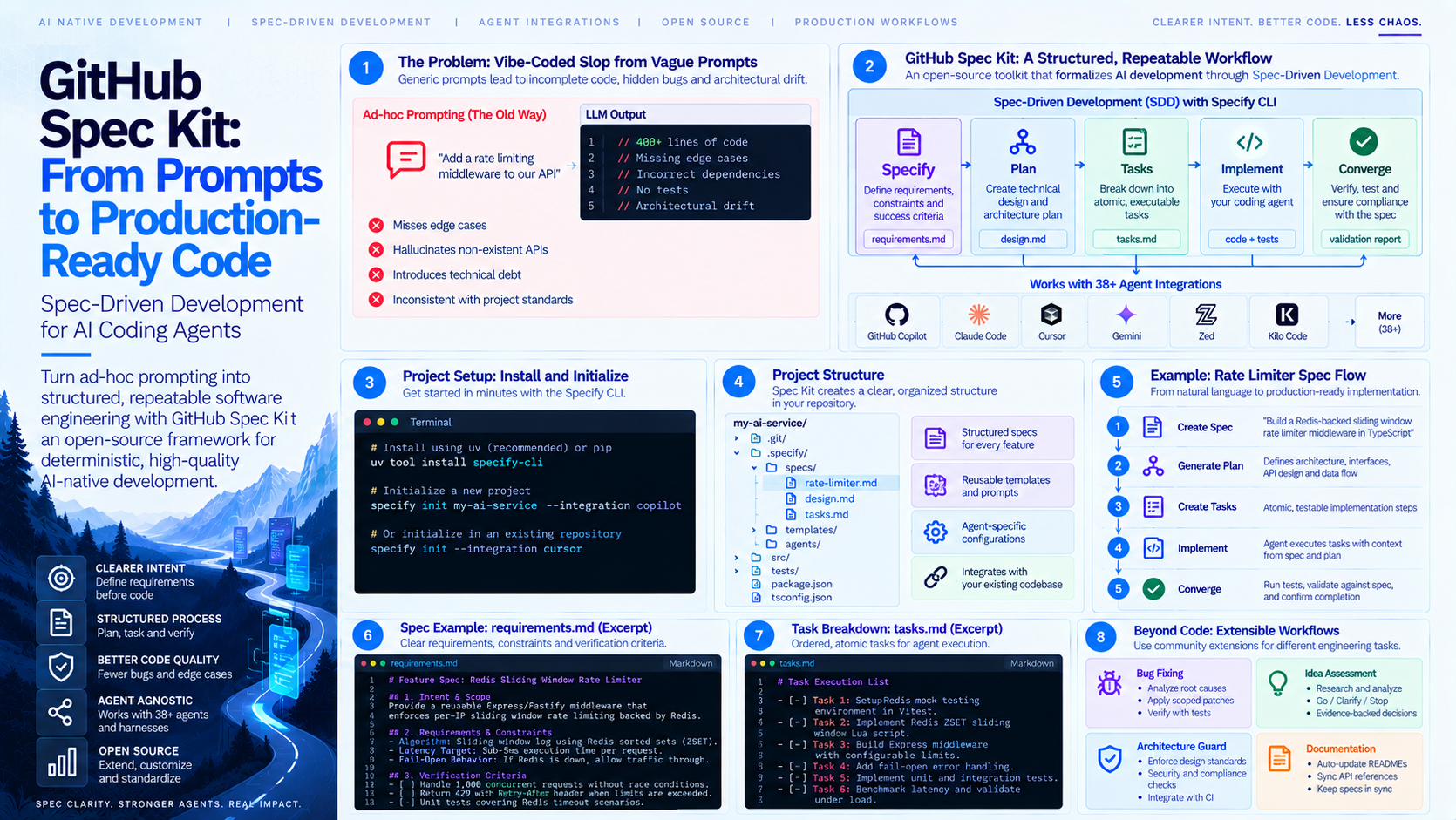
We’ve all been there: you open an AI coding assistant like Cursor, Copilot, or Claude Code, throw a sentence or two at it, and watch as it churns out 400 lines of plausible-looking code.
Ten minutes later, you’re drowning in subtle bug fixes, broken edge cases, and architectural drift.
The bottleneck in modern AI-native engineering isn't the model's ability to generate syntax it's intent and context alignment. When we feed agents vague prompts, we get vibe-coded slop.
To solve this, GitHub introduced GitHub Spec Kit an open-source framework built around Spec-Driven Development (SDD). Instead of jumping straight into raw code generation, Spec Kit forces you and your AI agent to align on intent, constraints, and verification before a single line of implementation is written.
Here is an opinionated, hands-on deep dive into why GitHub Spec Kit matters, how it works under the hood, and how to use it in your daily workflow.
What is GitHub Spec Kit?
GitHub Spec Kit is an extensible, agent-agnostic toolkit that turns ad-hoc AI prompting into structured, repeatable software engineering processes.
At its core, Spec Kit provides a CLI tool (specify-cli) that generates structured Markdown artifacts for your coding agents. These artifacts act as explicit contracts between human intent and machine execution.
+-----------------------------------------------------------------------------------+
|                                  Specify CLI                                      |
|                                                                                   |
|  [ Specify ] ----> [ Plan ] ----> [ Tasks ] ----> [ Implement ] ----> [ Converge ]|
|  (Requirements)    (Arch/Design)   (Breakdown)    (Agent Exec)        (Verification)|
+-----------------------------------------------------------------------------------+
                                         |
               +-------------------------+-------------------------+
               |                         |                         |
               v                         v                         v
        [ GitHub Copilot ]          [ Claude Code ]           [ Cursor / Zed ]
The Key Phases of Spec-Driven Development (SDD)
Specify: Define what needs to be built, non-functional requirements, constraints, and success criteria in a structured spec.
Plan: Establish the architectural blueprint, file structures, tech stack choices, and risk checks.
Tasks: Break the blueprint down into atomic, testable execution steps for your agent.
Implement: Hand off precise tasks to your preferred AI coding harness.
Converge: Verify that the generated implementation actually matches the original spec and passes testing bounds.
Hands-On: Setting Up Spec Kit
Spec Kit installs via Python's package manager (uv or pip) and supports 38+ agent integrations (including Copilot, Claude, Cursor, Gemini, Zed, and Kilo Code).
1. Installation & Initialization
You can bootstrap Spec Kit in a fresh directory or an existing repository:
# Install using uv (recommended) or pip
uv tool install specify-cli

# Initialize a project configured for your agent of choice
specify init my-ai-service --integration copilot
This creates a hidden configuration directory (.specify/) and populates it with tailored command templates and prompts optimized for your target agent.
A Real Workflow: Building an Agent-Guided Feature
Let's walk through how SDD actually works when building a rate-limiting middleware for an API.
Step 1: Generating the Spec
Run the specify command inside your agent terminal to trigger the specification harness:
specify create "Build a Redis-backed sliding window rate limiter middleware in TypeScript"
Spec Kit prompts your AI agent to draft a .specify/specs/rate-limiter.md file rather than writing code immediately. The output looks like this:
# Feature Spec: Redis Sliding Window Rate Limiter

## 1. Intent & Scope
Provide a reusable Express/Fastify middleware that enforces per-IP sliding window rate limiting backed by Redis.

## 2. Requirements & Constraints
- **Algorithm:** Sliding window log using Redis sorted sets (ZSET).
- **Latency Target:** Sub-5ms execution time per request.
- **Fail-Open Behavior:** If Redis is down, log an alert and allow traffic through (do not crash the service).

## 3. Verification Criteria
- [ ] Must handle 1,000 concurrent requests without race conditions.
- [ ] Must return `429 Too Many Requests` with standard `Retry-After` headers when limits are breached.
- [ ] Unit test suite covering Redis timeout scenarios.
Step 2: Planning and Task Decomposition
Once you review and approve the spec, you command your agent to create the architectural plan and execution task list:
specify plan
specify tasks
The CLI outputs a structured task list (tasks.md), breaking the feature into granular, verifiable steps:
# Task Execution List

- [ ] Task 1: Setup Redis mock testing environment in Vitest.
- [ ] Task 2: Implement Redis ZSET sliding window Lua script.
- [ ] Task 3: Build Express middleware wrapper with configurable window sizes.
- [ ] Task 4: Add fail-open error handling hooks.
- [ ] Task 5: Run integration tests and benchmark latency.
Step 3: Execution and Convergence
Now, your AI agent executes the tasks sequentially. Because every prompt is grounded in the explicit context of spec.md and plan.md, the agent doesn't hallucinate missing dependencies, alter function signatures midway through, or overwrite existing architectural patterns.
Finally, running specify converge evaluates the generated codebase against the initial criteria defined in your spec, confirming that the code is complete and compliant.
Beyond Code: The Extensible Harness Engine
What makes Spec Kit stand out isn't just SDD it's extensibility.
Spec Kit features over 15 community extensions, presets, and workflows. You aren't tied solely to feature building; you can swap processes for completely different software engineering tasks:
Bug Fixing: Structured workflows that analyze root causes, isolate failing cases, apply scoped patches, and record verification proofs.
Idea Assessment: An evidence-backed research loop that outputs a "Go", "Clarify", or "Stop" decision before writing code.
Architecture Guard / CI Guard: Community extensions that inject compliance, security, and linting checks directly into agent workflows.
Why Developers Should Care
The era of "vibes-based coding" is rapidly closing. As software teams scale their use of AI agents, success relies on deterministic context, clear specs, and harness governance.
GitHub Spec Kit provides a lightweight, open-source standard for running AI agents responsibly. By prioritizing human intent and verification over raw token throughput, it allows developers to stop micromanaging prompts and start engineering systems.